Showing posts with label SNI. Show all posts

Wednesday, May 1, 2024

Running BCFIPS in SpringBoot 3.2


I'm rewriting wrappers for a Spring Boot 1.5 application using Spring Boot 3.2 to help me eliminate some older dependencies I cannot even get patches for anymore.  So now I have to make my new Spring Boot application work with the latest Bouncy Castle FIPS code.

I've previously mentioned the NIST Certified Bouncy Castle FIPS TLS libraries in other posts.  SOAP is tremendously complicated to configure and manage.  REST is so much easier, and when you don't need all of the power of a SOAP stack, you can certainly send SOAP messages in XML quite readily using a normal REST transport layer.  You may need to write some extra marshalling code, but for standardized interfaces, that doesn't tend to be a big lift and there are plenty of existing tools to help (e.g., Faster Jackson XML).

There are a few challenges. One of these stems from the need for the BC-FIPS modules to validate themselves on startup.  This uses jar validation processes, but the code running the validation needs to be able to find itself.  That gets complicated by a minor change in Spring Boot 3.2 URL format when it repackages the application into an uber-jar. The URL conflicts with what the BC modules expect, and then they won't validate.  While the fix is a one-liner in BC-FIPS, it's a change to a certified software module, which means that it has to go through processes which make it take longer than anyone would like.

Spring Boot uber class loading has the ability to target classes which need to be unpacked from the Uber-jar before loading. The JAR files will then be unpacked from the uber-jar into your TEMP folder before being loaded, and those will be accessible from a different kind of URL, that of the JAR file, which BCFIPS knows how to resolve.

To make this work, you will need to update your configuration for the spring-boot-maven-plugin to tell it which jar files need to be unpacked.  The necessary lines of code are below:

            <plugin>
                <groupid>org.springframework.boot</groupid>
                <artifactid>spring-boot-maven-plugin</artifactid>
                <configuration>
                    <mainclass><!--your-application-main-class--></mainclass>
                    <requiresunpack>
                        <dependency>
                            <groupid>org.bouncycastle</groupid>
                            <artifactid>bcpkix-fips</artifactid>
                        </dependency>
                        <dependency>
                            <groupid>org.bouncycastle</groupid>
                            <artifactid>bc-fips</artifactid>
                        </dependency>
                        <dependency>
                            <groupid>org.bouncycastle</groupid>
                            <artifactid>bctls-fips</artifactid>
                        </dependency>
                    </requiresunpack>
                </configuration>
                <executions>
                    <execution>
                        <id>default-jar</id>
                        <goals>
                            <goal>repackage</goal>
                        </goals>
                    </execution>
                </executions>
            </plugin>
Rewriting my wrapper to ditch CXF and modernize to the latest Spring Boot will save a lot on future maintenance efforts and is already making the application much simpler.  There's plenty of glue code needed to run inside the CXF framework that can just be done away with.
As you now know, I had to go back and rework for SNI again too.  It turns out the same fix was basically needed, calling URLConnectionUtil.openConnection().

import org.bouncycastle.jsse.util.URLConnectionUtil;

  ...

  /**
   * This method obtains an SNI enabled Server Socket Factory
   * @param location The URL to obtain a connection for
   * @return An HttpURLConnection that supports SNI if the URL starts with HTTPS or has no URL Scheme.
   * @throws IOException
   */
  public HttpURLConnection getSNIEnabledConnection(URL location) throws IOException {
    String protocol = location.getProtocol();
    if (protocol == null || !protocol.startsWith("https")) {
      // Not HTTPS
      return (HttpURLConnection) location.openConnection();
    }
    URLConnectionUtil util = new URLConnectionUtil(getSSLContext().getSocketFactory());
    HttpsURLConnection conx = (HttpsURLConnection) util.openConnection(location);
    conx.setHostnameVerifier(ClientTlsSupport::verifyHostname);
    return conx;
  }


More fun with SNI and TLS with Akamai edge servers and Bouncy Castle internal_error(80)

Adam Savage "Well, there's your problem"Recently, endpoints that one of the systems I maintain frequently connects to underwent a change in how they hosted their servers.  They were moved into an Akamai edge server framework, which requires use of the Server Name Indicator (SNI) extension in TLS communications.  This isn't routinely enabled in a straight Java JSSE client connection, especially when using Bouncy Castle FIPS.  As I previously stated, you have to configure it in your code.

My guess is that when a request is made without the SNI TLS extension, the Akamai edge environment reports a TLS error.  Sadly, Akamai reports this TLS error using the TLS internal_error(80) fatal alert code instead of the more descriptive missing_extension(109).  That's because missing_extension(109) wasn't defined until TLS 1.3 (which is much more expressive of the reason for failure).

On my side, I had half-enabled SNI, where it was used for the main protocol request and response, but wasn't being used for the requests sent to the underlying authorization protocol (OAuth 2.0).  The reason that was missed was simply because it is a completely independent module.

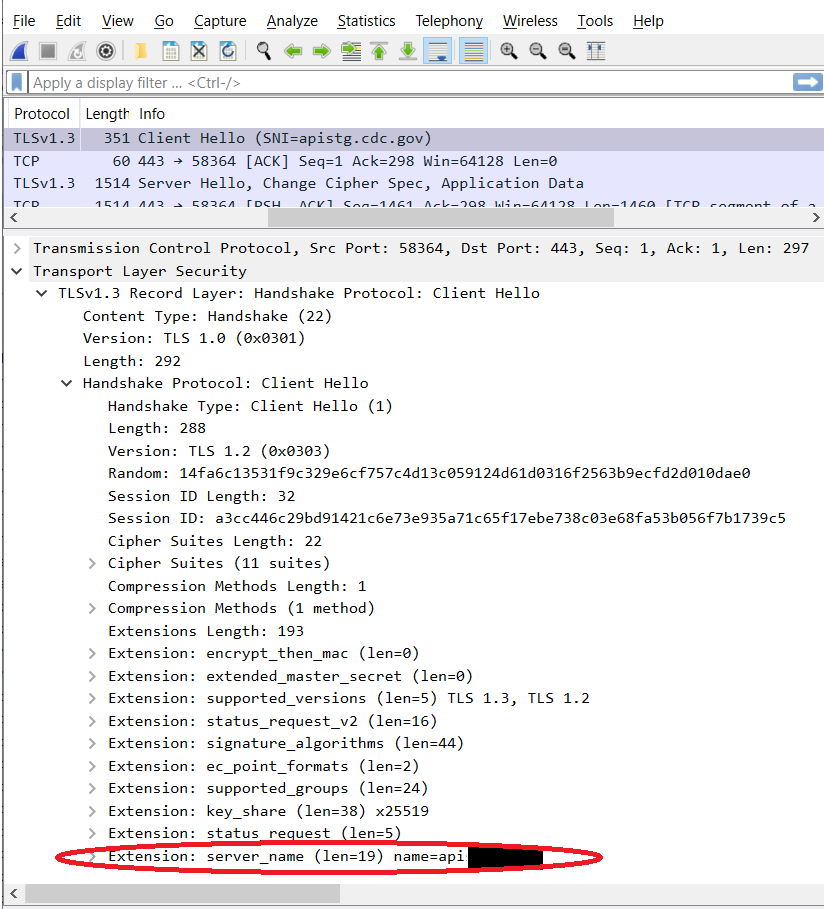
If you've got WireShark, and you see something like this in your capture, look at the list of extensions.

If server_name extension is missing, as in the above capture, you need to fix your code to use SNI.  Once you've fixed it, it should look like this: 


In any case, if you are using BC FIPS, and get an internal_error(80) while trying to connect to an Akamai Edge Server, and your TLS Client Hello doesn't contain the SNI Extension: Well, there's your problem.


Thursday, July 27, 2023

TLS 1.2, Server Name Indication (SNI) and SOAP via CXF

It seems that I am destined to become a deep expert in the vagaries of TLS these days.  My most recent challenge was in figuring out why Server Name Indication (SNI) extensions weren't simply working in my BC-FIPS implementation that I talked about in the last few posts.

Background on SNI

For a brief moment, let's talk a little about SNI.  TLS is a lower layer session protocol on top of TCP that encrypts communication.  HTTP and HTTPS are higher layer (Application) protocols on top of TLS.  When you connect to an IP address over TCP, then initiate a TLS connection, the application layer hasn't yet seen the HTTP request, let alone the Host header.  SNI serves, in TLS, the same function as the HTTP Host header.  Effectively, this works in the same way that the HTTP Host header does.

In HTTP, the Host header allows one server to service multiple web sites or DNS endpoints, but unless SNI is used each endpoint must be served with the same certificate, either using a wildcare or multiple alternate names. SNI allows one host to service multiple sites with different certificates for each site.

Integrating SNI with Apache CXF and BCFIPS

Reading through BCFIPS documentation, you'd think at first that all you need to do is enable SNI extensions by setting jsse.enableSNIExtension=true.  Sadly, that's not quite enough, as section 3.5.1 Server Name Identification states.

"... Unfortunately, when using HttpsURLConnection SunJSSE uses some magic (reflection and/or internal API) to tell the socket about the "original hostname" used for the connection, and we cannot use that same magic as it is internal to the JVM. 

To allow the endpoint validation to work properly you need to make use of one of three workarounds:"
And then goes on further to suggest the recommended workaround as follows:

3. The third (and recommended) alternative is to set a customized SSLSocketFactory on the HttpsURLConnection, then intercept the socket creation call and manually set the SNI host_name on the created socket. We provide a utility class to make this simple, as shown in the example code below.  
// main code block 
{   SSLContext sslContext = ...;
     URL serverURL = ...;
     URLConnectionUtil util = new URLConnectionUtil();
     HttpsURLConnection conn =  
        (HttpsURLConnection)util.openConnection(serverURL);
}
That's pretty simple.  What URLConnectionUtil.openConnection does is wrap the socket factory provided by conn (see HttpsURLConnection.setSSLSocketFactory) with one that calls a method to set the server name extension in createSocket after calling the original createSocket method found in the connection.

So, looking at CXF, it's the HttpURLConnectionFactory class that calls url.openConnection.  We could simply override that class and replace with a call to util.openConnection, according the code in that class.  Here's the original.

    public HttpURLConnection createConnection(TLSClientParameters tlsClientParameters,
        Proxy proxy, URL url) throws IOException {
        HttpURLConnection connection =
            (HttpURLConnection) (proxy != null ? url.openConnection(proxy) : url.openConnection());
        if (HTTPS_URL_PROTOCOL_ID.equals(url.getProtocol())) {
            if (tlsClientParameters == null) {
                tlsClientParameters = new TLSClientParameters();
            }
            try {
                decorateWithTLS(tlsClientParameters, connection);
            } catch (Throwable ex) {
                throw new IOException("Error while initializing secure socket", ex);
            }
        }
        return connection;
    }

And my modest adjustment to the first two lines:

        URLConnectionUtil util = new URLConnectionUtil(
            tlsClientParameters == null ? null : tlsClientParameters.getSSLSocketFactory()
        );
        HttpURLConnection connection =
            (HttpURLConnection) (proxy != null ? util.openConnection(url, proxy) : util.openConnection(url));

But for some reason, that didn't work.

Debugging this, what I found was that the decorateWithTLS method also wraps connection's socket factory, but it fails to actually look at the server socket factory that may have already been set on the HttpsUrlConnection that was passed into it.

Here's a picture of that method.


It goes on for almost another 100 lines, doing all sorts of weird gyrations that low level code that needs to work with multiple libraries often to, including reflection and a bunch of other oddities.

What's missing here, is an initial check to see if connection is already an HttpsURLConnection, and if so, if it's already got an SSL Socket Factory set other than the default.  In that situation, that's the socket factory (created by URLConnectionUtil) that needs to be wrapped yet again.  Looking through everything this method does, I realized:
  1. I don't care about other than JSSE implementations.
  2. My socketFactory is always set when I enter this method, and that's the one to use.
So, I replaced the middle if statement in my overridden function with:

    if (HTTPS_URL_PROTOCOL_ID.equals(url.getProtocol())) {
        if (tlsClientParameters == null) {
            tlsClientParameters = new TLSClientParameters();
        }
        HostnameVerifier verifier = SSLUtils.getHostnameVerifier(tlsClientParameters);
        connection.setHostnameVerifier(verifier);
    }

Which very much simplifies everything, as all the decorateWithTLS does of interest for me is to set the host name verifier.

So, that is how I enabled SNI with BCFIPS in an older version of Apache CXF.  There's other code you will need as well, because you'll have to get that subclass that creates the connection into the factory used by the Conduit.  That's outlined below.

public class HTTPConduit extends URLConnectionHTTPConduit {
    public static class Factory implements HTTPConduitFactory {
        @Override
        public org.apache.cxf.transport.http.HTTPConduit createConduit(HTTPTransportFactory f, Bus b,
            EndpointInfo localInfo, EndpointReferenceType target) throws IOException {

   
         HTTPConduit conduit = new HTTPConduit(b, localInfo, target);
            // Perform any other conduit configuration here
            return conduit;
        }
    }
    public HTTPConduit(Bus b, EndpointInfo ei, EndpointReferenceType t) throws IOException {
        super(b, ei, t);
        // Override the default connectionFactory.
        connectionFactory = new ConnectionFactory();
    }
}

Elsewhere in your application, you should include an @Bean declaration to create that bean in one of your configuration classes.

@Configuration class MyAppConfig {
    // ...
   @Bean HTTPConduitFactory httpConduitFactory() {
      return new HTTPConduit.Factory();
   }
    ...
}